
01
Every system you build dies in a busy week.
Spreadsheet, Notion, CRM tab. They all work for three days. Then a good week hits and the logging is the first thing to go, because it is the part that pays nothing.
For agencies, sales teams and founders who want to focus only on LinkedIn outreach. No manual monitoring. One click push to CRM.
No card required
5.0 on the Chrome Web Store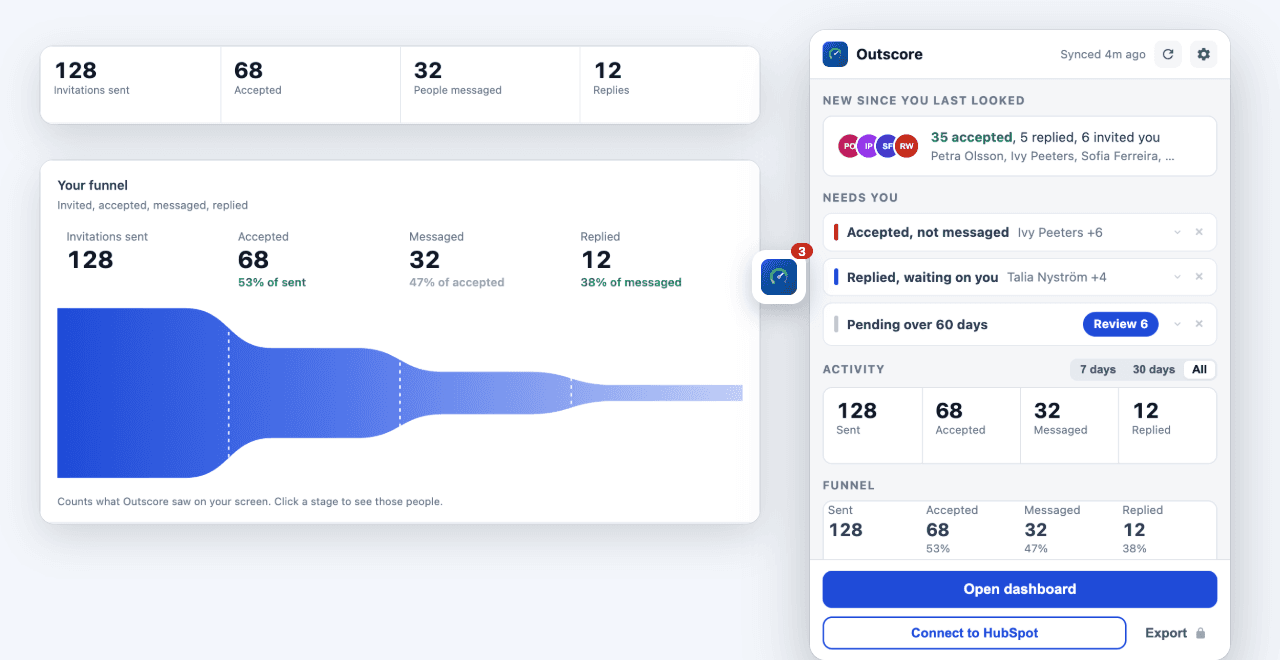
“Outscore has completely streamlined how I manage LinkedIn outreach. The LinkedIn-to-HubSpot integration is fast and seamless, connections import automatically with full contact info, no manual data entry required. What used to take hours of copying and pasting into our CRM now happens instantly and accurately. Highly recommend for anyone running LinkedIn-based prospecting at scale.”
Two minutes: tracking that fills itself in, then one click into HubSpot.
Spreadsheet, Notion, CRM tab. They all work for three days. Then a good week hits and the logging is the first thing to go, because it is the part that pays nothing.
LinkedIn shows you today. Not who accepted last week, not who ghosted, not who is still waiting on a reply from you.
Copying name, company, title and profile URL by hand is the worst ten minutes of the day, so it gets postponed until the context is gone.
You keep doing outreach exactly as you do now. Outscore writes it all down for you.
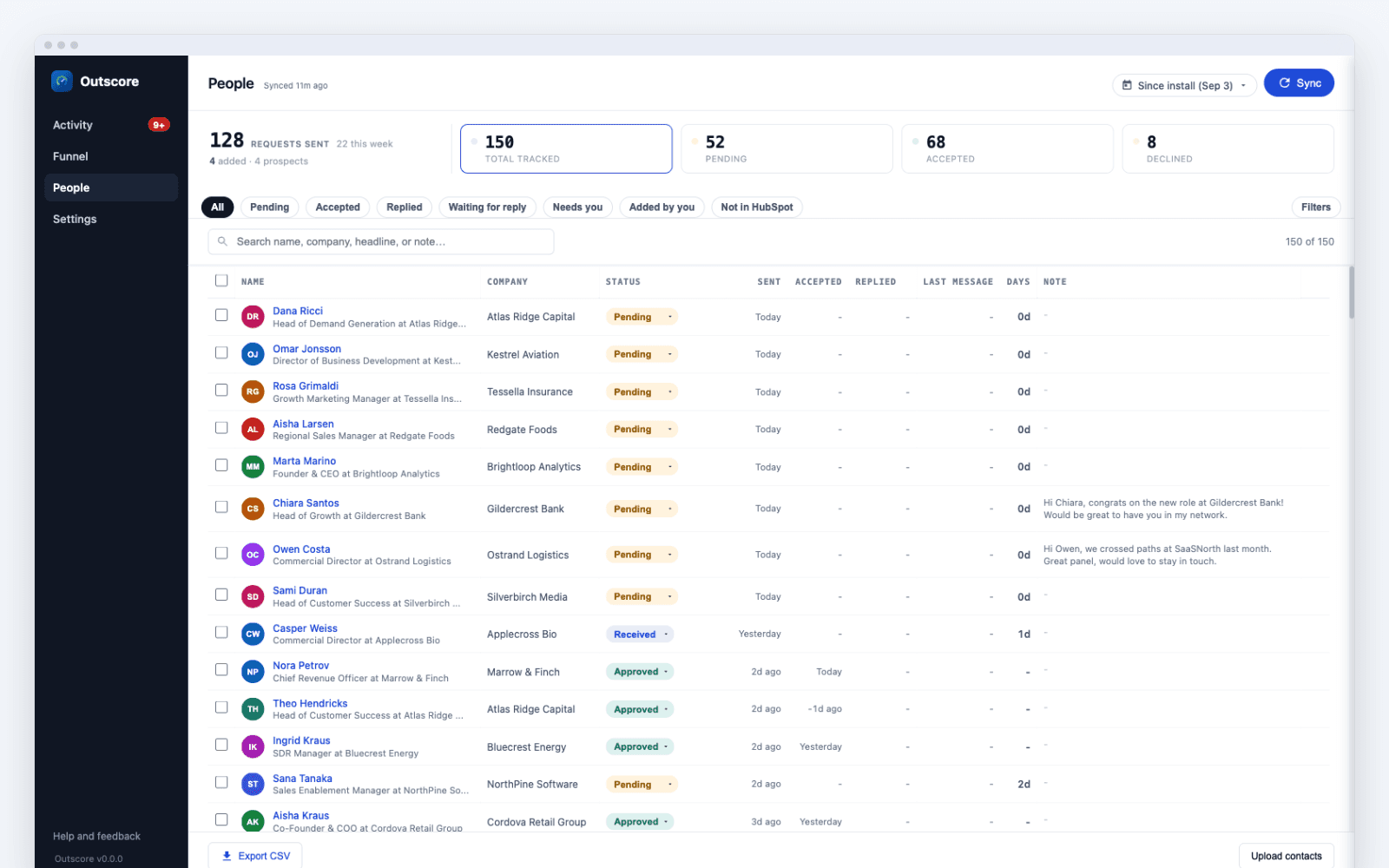
Every request you send and receive, with its status, connection note and contact details, in one People page. Quick tags show who is pending, who replied and who is not in HubSpot yet.
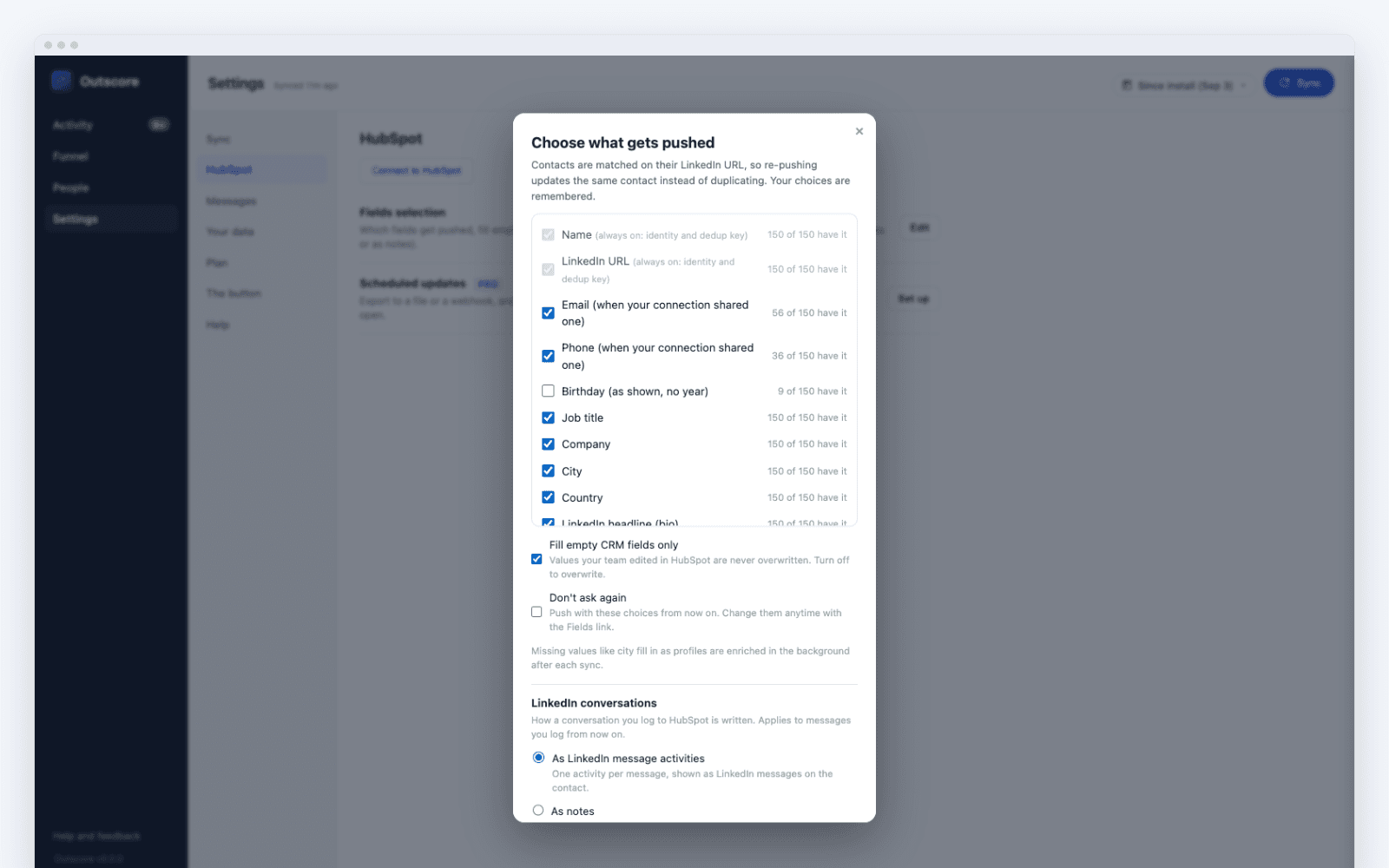
Download a CSV or push your data to your company HubSpot, choosing exactly which fields go. Only who you select to share. See the HubSpot integration.
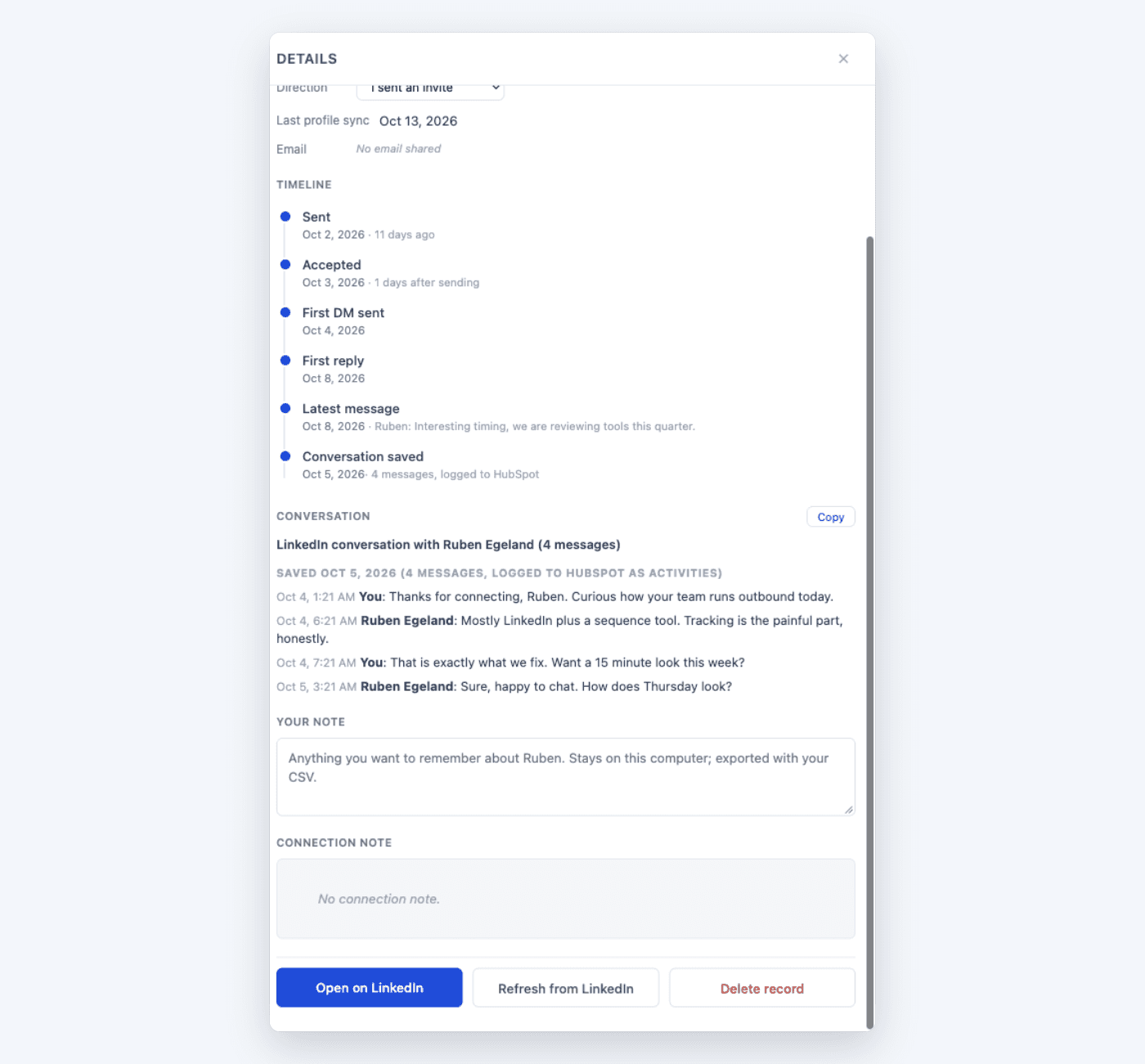
Save a LinkedIn conversation into Outscore in one click and read it any time, with or without a CRM. With HubSpot connected, it is logged as native activities on the contact.
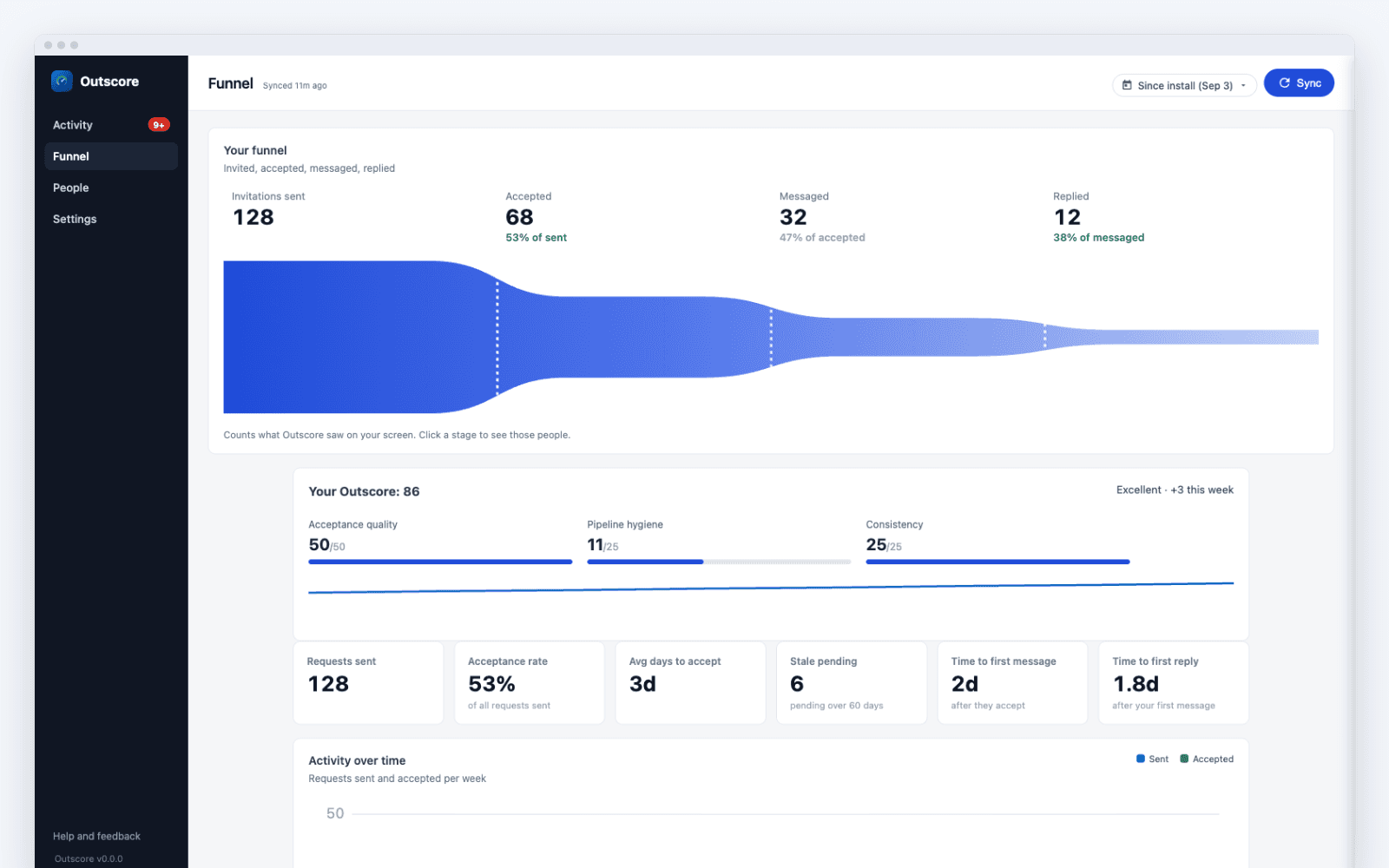
Invitations sent, accepted, messaged and replied, drawn to scale with the rate at every step. Click a step to see those people.
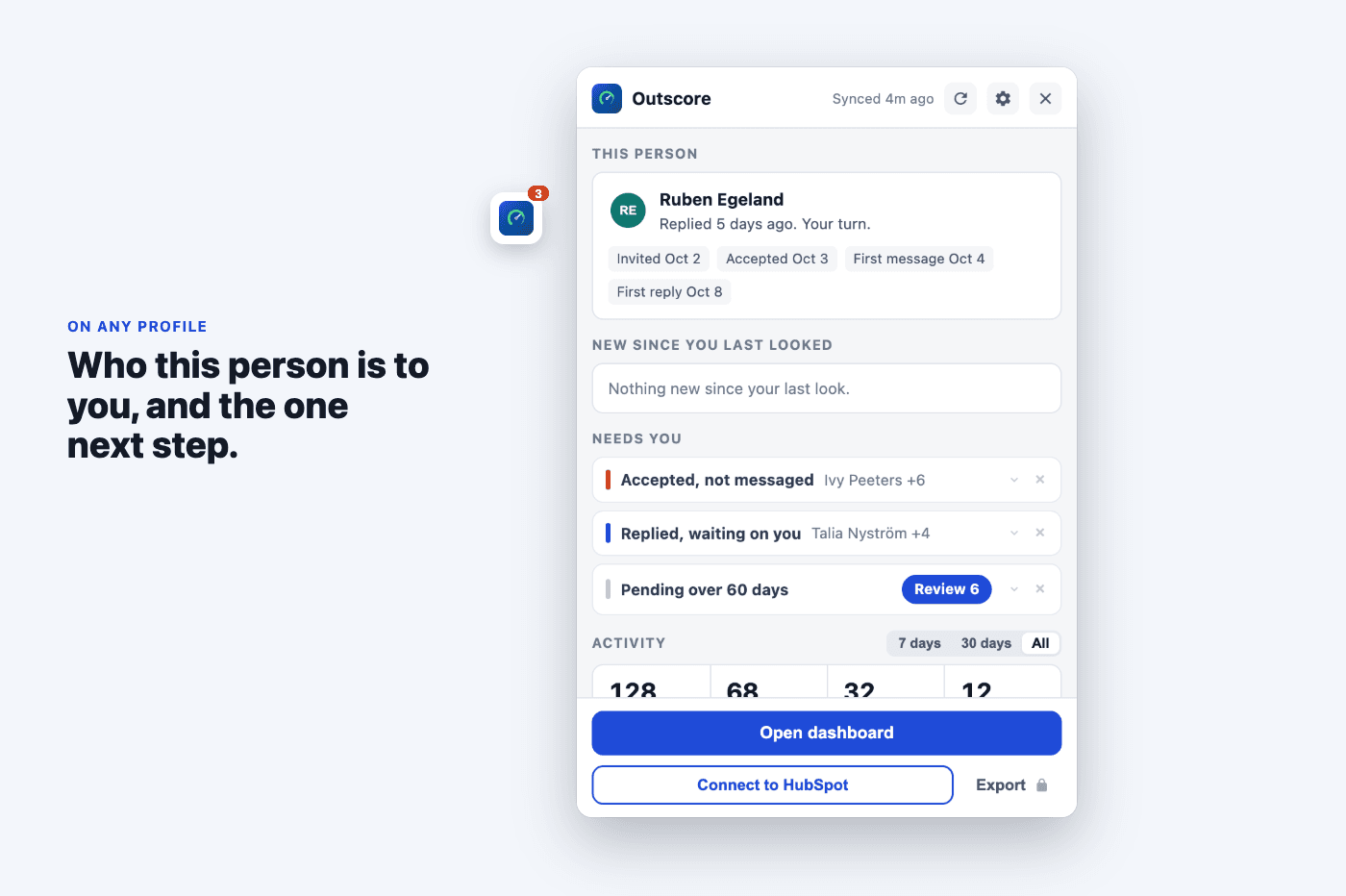
On any profile, Outscore shows when you invited them, when they accepted and replied, your note, and the one next step. Add any connection you already have in one click.
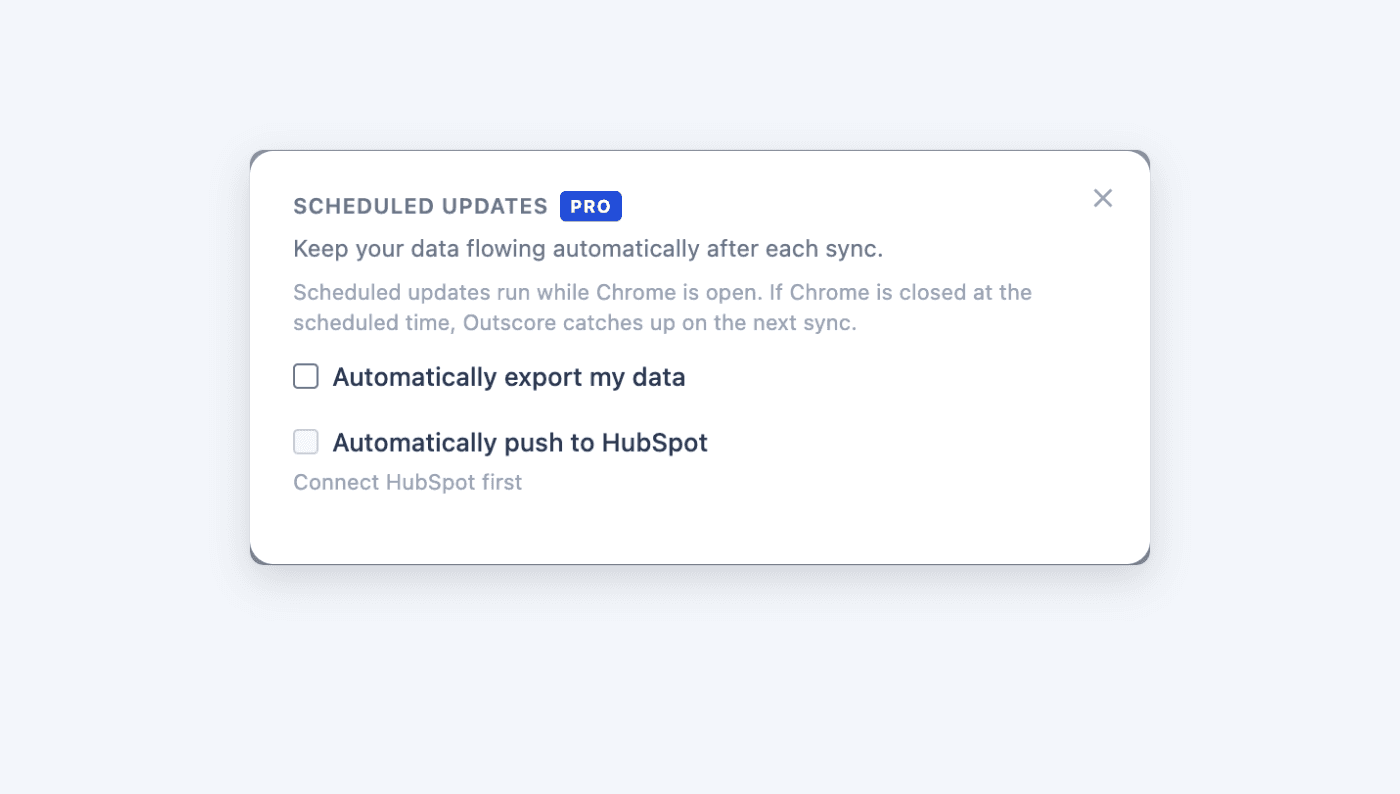
Keep your data flowing automatically after each sync. Download a CSV, send a webhook, or push to HubSpot.
Install the Outscore Chrome extension and run LinkedIn outreach your way. No learning curve, no headaches.
If you send LinkedIn connection requests daily and the words “accept rate” ever come up in your job, this is for you.
A real accept rate instead of a guess, and a list of who has been pending long enough to chase.
Which candidates accepted, across every role, without pasting names into a sheet between InMails.
No RevOps team. One clean number for the week, and one clean CSV you can hand to an investor or a new hire.
A reliable source of truth per client account, so your weekly reports match what actually happened.
Your team’s LinkedIn work never reaches the CRM, and hand-logging eats selling time. Even Sales Navigator’s admin reports (~$150 per seat per month) exclude connection requests entirely. Each rep pushes the connections they choose into HubSpot as owner; you read the per-rep pipeline there. Rates and counts, never anyone’s inbox. How to set it up.
Outscore is a tracking tool, not an automation tool. It’s meant to sit alongside your manual outbound, not replace it.
| Spreadsheet / Notion | Automation tools(Dux-Soup, Phantombuster, Waalaxy) | Outscore | |
|---|---|---|---|
| Tracks invitation status automatically | No, manual entry | Yes | Yes |
| Sends invitations for you | No | Yes | No, by design |
| LinkedIn account-ban risk | None | Elevated | Same as normal browsing |
| Where data is stored | Your spreadsheet / doc | Vendor’s cloud | Your browser only |
| Pricing model | Free (your time) | $40-$100 / month, per seat | Free · $49 one-time Pro |
| CSV export | You already have it | Usually paywalled tier | Included, one click |
| Pushes to your CRM without duplicates | No CRM sync | Duplicates are a common complaint | Yes, deduped by LinkedIn URL |
| Shows who replied and your reply rate | No, manual counting | Only for what the bot itself sent | Yes, for your real conversations |
Your tracked data lives in your own browser, and Outscore never reports on you to anyone: not your employer, not your manager. Nothing leaves your machine until you export it or push it to your CRM, and you pick exactly who and what goes. The full privacy policy covers the rest.
Everything is free for your first 14 days, no card. After that your stats stay free; Pro keeps the full list and adds the CRM sync and exports. Pay monthly and cancel any time, or take the lifetime price while it lasts.
Early-bird price while we are new. When it ends Pro is monthly only, and everyone who bought lifetime keeps it for life.
Start for freeAlready installed? Buy ProInstall free, upgrade to Pro any time from the extension.
Answers to the things people ask before they install.
Outscore is a Chrome extension that automatically tracks your LinkedIn outreach pipeline. It records who accepted your connection requests, who's still pending, who declined, and, as of version 2.12, the message layer too: first message sent, first reply received, and the latest message per contact, with a Sent to Accepted to Messaged to Replied funnel and a real reply-rate KPI. Export it all to CSV or push the contacts you choose to HubSpot.
The LinkedIn data it tracks is stored in your own browser. We never sell it or share it with your employer, and a CSV export you trigger is the only way that data leaves your machine.
No. Outscore is a tracking and reporting tool, not an automation tool. You send invitations manually on LinkedIn as you normally would; the extension silently records their status in the background.
This is a deliberate choice. It keeps you within LinkedIn's user agreement and avoids the account risk associated with auto-invite tools.
Those tools automate sending invitations and messages, which carries account-ban risk and often requires cloud access to your LinkedIn session. Outscore only observes and reports. It does not send, scrape profiles in bulk, or use your credentials on a remote server.
It's designed to sit alongside your manual outbound, not replace it.
The LinkedIn data Outscore tracks (names, companies, and invitation statuses) is stored in your browser's local IndexedDB. It is never sold and never shared with your employer. It only leaves your machine when you choose to send it: a CSV export, or a CRM sync where you pick exactly which people and fields go and your contacts travel from your browser to your CRM (we broker the connection, not your data). The extension itself sends only anonymous usage counts, never your contact data.
If you uninstall the extension, the tracked data is deleted with it.
The extension only reads pages you already visit during normal LinkedIn use. It does not send invitations, messages, or connection requests on your behalf, and it does not bulk-scrape profiles.
Because it never performs actions that aren't already part of your manual workflow, the risk profile is the same as browsing LinkedIn yourself.
Yes. Sales Navigator and Recruiter sessions are signed into the same linkedin.com domain, so the extension tracks invitations sent from those surfaces the same way it tracks invitations sent from the standard LinkedIn UI.
Google Chrome is the primary supported browser. Other Chromium-based browsers such as Microsoft Edge, Brave, and Arc generally work because they accept Chrome Web Store extensions, but Chrome is the only officially tested environment.
Free to start, no credit card. New installs get everything for 14 days. After that your stats stay free forever: automatic tracking, acceptance and reply rates, auto-sync, the LinkedIn button and side panel, the Funnel page, and the first 5 rows of any contact list. Outscore Pro keeps the full list and unlocks one-click CRM sync, CSV export, and scheduled updates. Pro is $10 a month, cancel any time, or a one-time $49 for lifetime access while the early-bird price lasts; anyone who buys lifetime keeps it for life.
Yes. The extension supports CSV import, so you can bring in historical invitations you already tracked in a spreadsheet or CRM and have them appear alongside new invitations the extension picks up automatically.
Yes. Outscore Pro pushes the connections you pick straight into HubSpot as contacts, with company, job title, LinkedIn URL, owner, and a timeline note on each, deduped so re-syncing updates the same contact instead of creating a duplicate. You choose exactly who and which fields get sent; it's your personal LinkedIn account, so you stay in control of what leaves it. Pro can also keep HubSpot updated automatically after each sync, so newly accepted connections flow in without you clicking Push. Salesforce is coming next, and CSV export covers any other tool (Pipedrive, Attio, Notion, Google Sheets).
Auto-sync runs on a schedule you choose. When LinkedIn is open in your browser the extension quietly checks the invitation-manager pages, updates statuses that have changed, and writes the result to local storage. You can also trigger a manual sync on demand.
The primary users are sales development reps (SDRs), account executives, recruiters, founders doing outbound, agency operators, and solo business developers. Anyone who sends LinkedIn connection requests daily and needs to know their accept rate and pipeline status without maintaining a spreadsheet. It also works as a team setup: each rep tracks their own outreach and pushes chosen connections to the CRM, and the manager reads the per-rep pipeline there.
Yes, and it works differently from monitoring tools. Each rep runs Outscore on their own account, sees their own acceptance and reply rates, and pushes the connections they choose into the company CRM with themselves as contact owner. The manager reads the per-rep pipeline in the CRM: rates and counts, never anyone's inbox. A conversation reaches the CRM only when the rep explicitly pushes that thread. Reps consent because they control what syncs; managers get real numbers with zero rep time spent on logging. Even Sales Navigator's admin reports (Advanced tier, about $150 per seat per month) exclude connection requests entirely, so this data is otherwise unavailable at any price.
Practical, sourced answers for SDRs, recruiters, and founders doing daily LinkedIn outbound.
Seven vendor studies put it between 26% and 51%. What the data actually says, and how to measure your own rate.
How many invites you can send per week, who gets more, and what happens when you go over.
What triggers a restriction, how long it lasts, and the prevention checklist that keeps outbound teams sending.
When invites expire, how fast people actually accept, and when to withdraw a stale one instead of waiting.
What SSI measures, its four components, how to check yours for free, and whether it matters for outreach.
An honest comparison of automation suites, tracking-only extensions, and the free manual methods.
LinkedIn never notifies you. The signals that reveal a decline, and how it differs from a withdrawal or an expiry.
Where LinkedIn hides your sent invitations, how to withdraw stale ones, and how to keep the history it deletes.
Push your connections into HubSpot as contacts, deduped by LinkedIn URL, plus what the native Sales Navigator integration does and does not sync.
Every method compared: the native Sales Navigator sync and what it requires, the CSV route for your actual connections, and the Zapier options.
Install the Chrome extension and run LinkedIn outreach your way. No learning curve, no headaches, nothing to log. Free to start, no card required.